
You know how one dryer problem can look like three different failures at once, no tumble, no heat, and a terrible noise. This Ultimate Kenmore Dryer Repair Guide: Troubleshooting, Tips, and Solutions is built to help you sort that out fast, before you spend money on the wrong part.
In my 25 years repairing home appliances, the pattern I see most often is simple: homeowners replace a fuse, thermostat, or belt before they confirm the model number and the real root cause.
Updated 2026 pricing from Angi puts most dryer repair jobs in the $100 to $430 range, which is exactly why a few careful checks can save you real money.
So, I am going to break down the common failures, show you how to test the key parts safely, explain which replacement parts actually make sense, and point out when it is smarter to call for service.
Key Takeaways
- Most dryer repair jobs in the U.S. now land between $100 and $430, while common DIY parts are far cheaper, including drive belts at about $14 to $32, thermal fuses at $5 to $18, and drum rollers at $20 to $55.
- If your electric Kenmore tumbles but will not heat, check the 240-volt supply first. Many models will still run the motor on one 120-volt leg, even though the heater cannot turn on.
- Clean the lint filter every load, and clean the vent at least once a year. NFPA research shows failure to clean was a factor in 33% of dryer fires.
- Before you order parts, find the full model number. Kenmore’s manual center says model numbers are typically at least 11 characters, and the first three digits often reveal the original platform.
- If you already have the cabinet open for a belt or squeal issue, it often makes sense to replace the belt, idler pulley, and support rollers together so you do not repeat the teardown.
What Are Common Kenmore Dryer Problems?
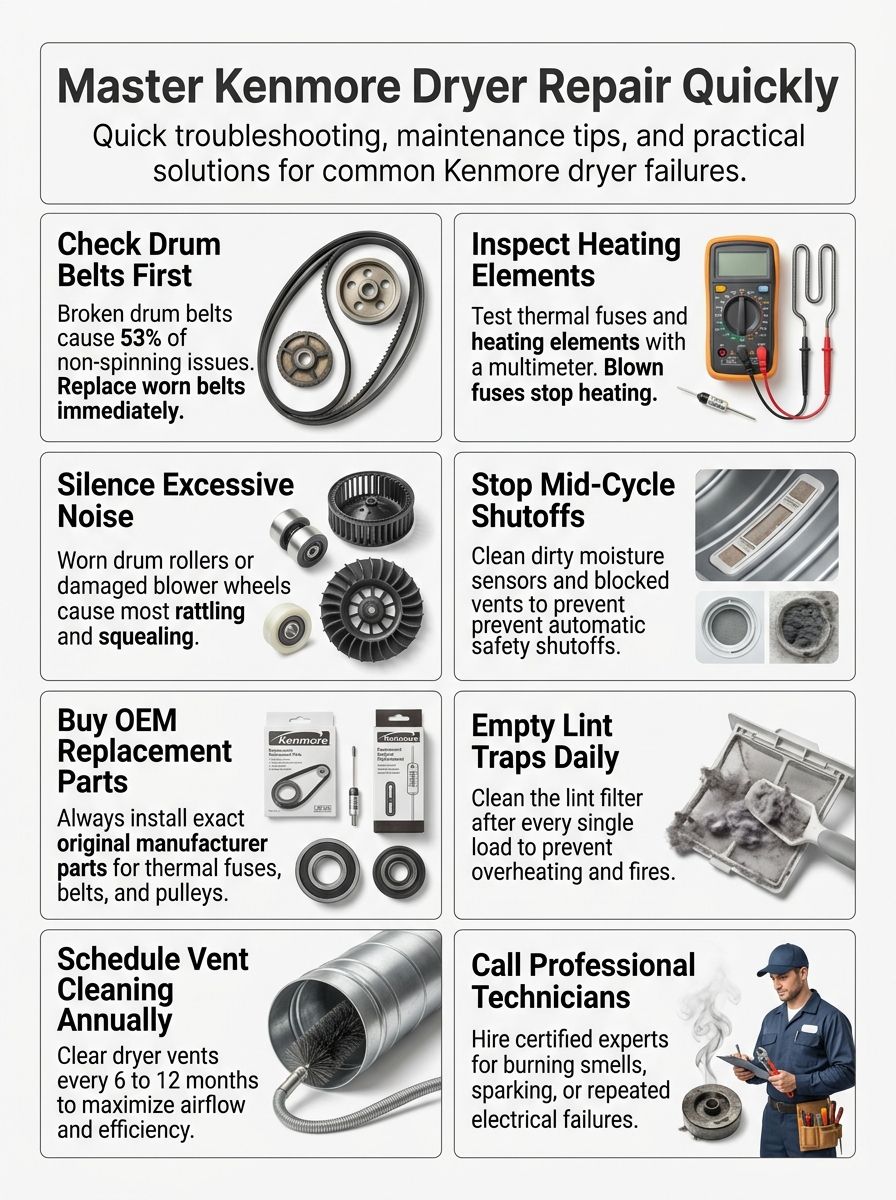
Most Kenmore dryer failures fall into four buckets: the drum will not turn, the dryer runs but does not heat, the machine gets noisy, or it shuts off before the load is dry.
The useful starting point is your full model number. On many Kenmore dryers, the first three digits point you to the original platform, which matters because a 110-series machine often follows a Whirlpool-style repair path, while 417 and 796 platforms use different layouts and parts.
Use model-specific manuals and the official parts lookup before you order anything. That one step cuts down a lot of wrong-part purchases.
Watch a quick symptom overview video
Why Won’t My Kenmore Dryer Spin?
If the motor hums or runs but the drum does not move, start with the drive system. That usually means the belt, idler pulley, drum rollers, or a seized support point.
On many common 110-prefix dryers, a snapped belt or frozen idler pulley is the fastest answer. If the drum is hard to turn by hand, look harder at rollers, glides, or a worn bearing surface.
- Motor runs, drum stays still: suspect the belt or idler first.
- Drum is stiff by hand: suspect rollers, glides, or a bearing issue.
- Burning smell with no tumble: stop using the dryer and inspect for a jammed drum or slipping belt.
- No sound at all: check the door switch, power supply, and start circuit before you open the cabinet.
If you are asking, “Why won’t my Kenmore dryer spin?”, this is the most practical order: belt, idler pulley, rollers, then motor.
A failed belt or roller system is a common place to start, and owner discussions also point to deeper drive-system faults when the simple checks come up clean.
Why Is My Kenmore Dryer Not Heating?
No heat on an electric Kenmore often comes down to one of two things: airflow or power. The important distinction most people miss is that the drum can still turn even if one side of the 240-volt supply is lost.
Start by checking the breaker, outlet, and terminal block. If power is good, move to the heating element, thermal fuse, high-limit device, and cycling thermostat.
Gas models add a second branch to the diagnosis. Confirm the gas valve is open, then check the igniter and flame-related parts if the dryer tumbles but never warms.
| Symptom | Most likely first check | Why it matters |
|---|---|---|
| Drum turns, no heat | 240-volt supply | The motor can run on partial power, but the heater cannot. |
| Starts hot, then cools down | Vent restriction | Restricted airflow overheats the cabinet and trips safety parts. |
| Gas model never ignites | Gas supply and igniter | You need fuel and spark before deeper parts testing. |
| Long dry times | Lint filter and exhaust vent | Poor airflow can mimic a bad heating system. |
Some electronic models display airflow-related faults, so if your dryer shows a vent warning or restricted-airflow code, treat the vent as a repair item, not routine housekeeping.
What Causes Excessive Noise in My Kenmore Dryer?
The sound usually tells you where to look. A repeating thump often points to a flat-spotted roller. A high squeal usually leads to the idler pulley or glides. A rattle or scraping noise often comes from the blower wheel or something trapped in the drum path.
Check the easy items first: leveling feet, coins or zippers in the drum, and loose items near the blower housing. If the noise stays, open the cabinet and inspect the wear parts.
- Thump once per rotation: worn drum roller or flat spot.
- High squeal on startup: idler pulley or glide wear.
- Metallic scrape: drum seal, glide, or foreign object.
- Fast rattle or vibration: blower wheel crack, lint buildup, or stripped hub.
A damaged blower wheel can sound much worse than it looks, especially when lint packs into the fins and throws the fan out of balance.
One pro tip I share a lot: if you already have the dryer apart for a squeal, do not stop at the belt if the rollers or idler feel rough. That is how repeat noise calls happen.
Why Does My Kenmore Dryer Shut Off Mid-Cycle?
Mid-cycle shutdown usually means the dryer is protecting itself, or the controls think the load is already dry.
Start with the airflow path. A blocked lint screen housing, crushed vent, or clogged wall duct can overheat the dryer and open a thermal safety device. If airflow is fine, move to the moisture sensor, cycling thermostat, door switch, and control board.
If your dryer runs normally on Timed Dry but shuts off early on an automatic cycle, the moisture sensor is one of the first parts worth testing and cleaning.
Residue on the sensor bars can make the dryer think wet laundry is already dry. That is an easy fix compared with chasing control-board issues.
Troubleshooting a Kenmore Dryer That Won’t Spin
For a drum that will not turn, focus on the drive path before anything else. Updated 2026 cost data shows “not spinning” repairs often land on the lower end of the range, which is why this is one of the better DIY dryer repair jobs if you work carefully.
If you want an outside walkthrough before opening the cabinet, this dryer repair resource gives a helpful symptom-first view.
Watch the drum-drive repair video
How Do I Check the Drive Belt for Damage?
Unplug the dryer first. Then remove the access panel or front panel based on your model so you can see the belt wrapped around the drum.
You are looking for obvious breaks, heavy fraying, glazing, or a belt that has slipped off the motor pulley and idler path. If the motor runs but the drum sits still, the belt is the lead suspect.
- Unplug the dryer and remove the front or top access panel.
- Inspect the belt for cracks, frayed edges, or a full break.
- Check whether the belt is still routed correctly around the motor and idler.
- Spin the drum by hand and feel for drag that may have destroyed the belt.
For many Whirlpool-built 29-inch platforms, Whirlpool sells maintenance kits such as 4392065RC that bundle the belt, idler pulley, and rollers. That is helpful when multiple wear parts are tired, but only order a kit after you confirm the exact model.
If the belt failed because the drum was binding, replace the cause, not just the belt. Otherwise the new part can snap again in a hurry.
How Do I Inspect the Idler Pulley and Drum Rollers?
Once the belt is off, rotate the idler pulley and each support roller by hand. Good parts spin smoothly and quietly. Bad parts wobble, grind, or feel stiff.
This is where a lot of DIY repairs stall. A new belt can still squeal or slip if an old idler pulley or roller is dragging.
| Part | What to look for | What to do |
|---|---|---|
| Idler pulley | Rough spin, wobble, or squeal | Replace it |
| Drum rollers | Flat spots, rough bearings, side play | Replace as a set or at least in pairs |
| Roller shafts | Scoring, grooves, heavy wear | Replace if the new roller does not sit snugly |
| Leveling feet | Dryer rocks on the floor | Adjust before retesting |
Tech forums are consistent on one point: if the cabinet is already open and the rollers feel questionable, replace the wear set together. That saves labor later and usually gives you a quieter machine.
Fixing a Kenmore Dryer That Won’t Heat
A no-heat complaint needs a simple order. Start with power and airflow, then test the heater circuit. That keeps you from replacing a perfectly good heating element when the real problem is a tripped breaker or a blocked vent.
Watch the no-heat repair video
How Can I Examine the Heating Element?
Unplug the dryer and let it cool. Remove the panel that gives you access to the heater housing, then disconnect at least one wire from the element before testing resistance.
On many common Whirlpool-built electric Kenmore dryers, a healthy element reads roughly 8 to 12 ohms. An open reading, often shown as OL on a meter, means the element has failed.
- Set the meter to resistance.
- Touch one probe to each heater terminal.
- Look for a steady reading in the expected range for your platform.
- Inspect the coil for a visible break or signs of grounding to the metal housing.
A common trap is replacing the element without fixing the airflow issue that overheated it. If lint packed the vent or blower housing, the new part can fail again.
Many 110-prefix electric models use heater families like WP3387747 or 279838, but appearance alone is not enough. Match by full model number, then verify again before you install.
How Do I Test the Thermal Fuse and Thermostat?
Disconnect power, remove the rear or lower access panel, and locate the thermal fuse and thermostat on or near the blower housing or heater housing. Dryer layouts vary, so the manual matters here.
Set the meter to continuity and test each part with at least one wire removed. A good thermal fuse or closed thermostat should show continuity at room temperature. No continuity usually means the part has opened and needs replacement.
Do not stop at the blown fuse. In real service work, the bigger fix is often the vent cleaning, lint removal, or thermostat issue that caused the fuse to open.
CPSC guidance says to clean the lint screen before or after each load, and the U.S. Fire Administration advises cleaning the vent system at least yearly. That maintenance directly lowers the odds of repeat no-heat failures.
Addressing Excessive Noise in Kenmore Dryers
Noisy dryers are frustrating, but they are usually very diagnosable. The key is matching the sound to the moving part that makes it.
If you hear the noise only when the drum is full, suspect support parts or leveling first. If you hear it empty and full at the same speed, the blower wheel becomes more likely.
How Do I Inspect Drum Support Rollers and Axles?
Unplug the dryer, remove the belt tension, and rotate the drum by hand. If it drags, thumps, or feels rough, inspect the rollers and their shafts closely.
Rollers should turn smoothly with no heavy resistance. If you see flat spots, cracking, or sloppy movement on the shaft, replace them.
- Replace both rollers when one is clearly worn.
- Inspect the shaft before installing the new roller.
- Check the rear drum seal or glide area if the rollers look fine.
- Level the dryer before final testing so vibration does not fool your diagnosis.
The most overlooked step, in my experience, is checking the axle surface itself. A new roller on a badly worn shaft often buys you only a short quiet period.
How Can I Check for Loose or Worn Blower Wheels?
Access the blower housing and spin the wheel by hand. You are checking for cracks, wobble, loose fins, or a hub that has stripped on the motor shaft.
Lint buildup matters here more than many homeowners expect. A wheel packed with lint can vibrate, rub, and cut airflow at the same time.
| Noise pattern | Likely blower-wheel clue | Best next step |
|---|---|---|
| Fast rattle | Loose wheel or debris in fan housing | Clean housing and inspect wheel fit |
| Buzzing with poor drying | Lint-choked wheel | Clear the housing and vent path |
| Grinding at motor speed | Cracked wheel or stripped hub | Replace the wheel |
If the blower wheel is damaged, replace it instead of trying to glue or tighten it back into service. Fan parts live in heat and lint, so shortcuts do not hold up well.
Solutions for Dryers That Shut Off Mid-Cycle
If your Kenmore stops before the load is dry, separate sensor issues from overheating issues. That one decision will save you a lot of time.
Run one load on a timed cycle and another on an automatic cycle. If Timed Dry works but Auto Dry quits early, stay in the sensor lane. If both cycles stop, go back to airflow, thermostat, and safety parts.
How Do I Test the Moisture Sensor?
The moisture sensor usually sits inside the drum or near the lint filter housing as two metal strips. Its job is simple: it reads how much moisture remains in the clothes.
If the strips get coated with residue, the dryer can think the load is dry too soon. Support documentation from major dryer makers notes that residue and contamination can reduce sensor accuracy, so cleaning is a real repair step, not a superstition.
- Unplug the dryer.
- Locate the sensor bars and inspect them for film or residue.
- Clean them with a soft cloth and a non-abrasive cleaner.
- Test the dryer again on Auto Dry and compare it with Timed Dry.
If the dryer behaves normally on Timed Dry but still quits early on Auto Dry after cleaning, inspect the sensor wiring and then the control logic for your model.
How Often Should I Clean the Lint Trap and Vent?
Clean the lint trap after every load. That is the baseline, not an extra step.
Vacuum the lint-screen housing regularly too, because the screen does not catch everything. Then schedule a full vent cleaning at least once a year. If you have pets, a large family, or a long vent run, every six months is a smart maintenance interval.
A national appliance service program advises more frequent professional vent cleaning for heavier-use homes, and that lines up with what field techs see.
- Every load: clean the lint screen.
- Monthly: vacuum the lint-screen housing and check the outside vent flap.
- Every 6 to 12 months: clean the full vent path.
- Immediately: clean sooner if dry times jump or the dryer cabinet feels unusually hot.
Recommended Kenmore Dryer Replacement Parts
The best replacement part is the one that matches your exact model, not the one that looks close. Kenmore sells dryers built on different platforms, so part compatibility starts with the model tag.
As of 2026, Kenmore’s manual finder says model numbers are at least 11 characters long. Enter the full number, including the prefix, before you compare parts, manuals, or diagrams.
What Drive Belts and Idler Pulleys Are Best for Kenmore Dryers?
Use OEM or clearly model-matched replacement parts. Belts and idler pulleys are cheap compared with the labor of reopening a dryer.
On many 110-prefix dryers, the common wear package is a belt, an idler pulley, and the support rollers. Whirlpool’s 29-inch maintenance kits are a good example of why bundled wear parts make sense on that platform.
| Kenmore platform clue | What it usually means | Best buying advice |
|---|---|---|
| 110 prefix | Whirlpool-style layout | Check for a matched wear kit if belt and rollers are both tired |
| 417 prefix | Frigidaire or Electrolux-style layout | Do not assume 110-style belt routing or roller kit fit |
| 796 prefix | LG-style layout | Order strictly by full model number and diagram |
If the old belt shredded, inspect the idler and rollers before you fit the new one. Belts usually fail because something else got tight first.
Which Thermal Fuses and Heating Elements Should I Use?
Use the exact thermal fuse and heater assembly listed for your model. Safety parts are not a place to guess.
For electric dryers, verify the heating element by resistance and by model fit. For thermal fuses and thermostats, confirm both the part number and the mounting style, because two pieces can look almost identical and still wire differently.
- Match by full model number, not by brand name alone.
- Replace failed thermal safety parts with the exact rated replacement.
- Inspect the vent and blower housing before installing the new part.
- Check the terminal block and wiring if you see heat damage or discoloration.
If you are dealing with repeated no-heat calls, inspect the harness and terminal block before ordering another heater. Burned connections can imitate part failure.
Comparing Kenmore and Whirlpool Dryer Repairs
This is one of the biggest shortcuts in dryer troubleshooting. Some Kenmore dryers follow Whirlpool repair logic very closely, but not all of them do.
If your model starts with 110, many repair videos, part families, and teardown steps will feel very familiar to Whirlpool owners. If your tag starts with 417 or 796, stop and use the correct platform guide instead.
See also: Whirlpool Dryer Repair Guide
The Whirlpool Dryer Repair Guide is most useful when your Kenmore shares that platform. That is why the model prefix matters before you order parts or copy a repair video.
Use Whirlpool-style guidance first for 110-prefix machines, especially for drum-drive repairs, heater checks, and common 29-inch cabinet teardowns. For other prefixes, use the exact Kenmore diagram and manual for your machine.
| Prefix | Common platform association | What changes for you |
|---|---|---|
| 110 | Whirlpool-built | Parts and repair flow often cross over well |
| 417 | Frigidaire or Electrolux family | Different belt path, controls, and service access |
| 796 | LG family | Different sensor and control layouts, often different disassembly steps |
That one check can save you from following the wrong video, ordering the wrong kit, or misreading a fault pattern.
Preventative Maintenance Tips for Kenmore Dryers
Dryer maintenance is cheaper than dryer repair, and this is the part most breakdowns give away in advance. Longer dry times, hotter cabinet surfaces, and more lint around the machine are all early warnings.
Use these habits as routine maintenance, not as a response after something burns out.
How Often Should I Clean the Lint Trap?
Clean it after every load. Kenmore’s own maintenance advice says the lint filter should be cleaned after each load, and that is still the right standard in 2026.
If you use dryer sheets, wash the screen occasionally because residue can reduce airflow even when the screen looks clean. A screen that sheds water instead of letting it pass easily often has buildup on it.
- Pull lint off after every cycle.
- Vacuum the filter slot monthly.
- Wash the screen if it looks shiny or airflow seems weak.
- Replace the screen if the frame is warped or the mesh is torn.
Why Is Regular Dryer Vent Cleaning Important?
Because clogged vents waste energy, slow drying, overheat components, and raise fire risk. NFPA’s latest dryer-fire research says failure to clean was involved in one-third of dryer fires, which makes vent cleaning one of the highest-value maintenance jobs in the house.
DOE weatherization guidance calls for the shortest practical vent run using rigid or semi-rigid metal material. That matters because crushed foil-style runs trap lint faster and cut airflow sooner.
Watch for these signs that the vent needs attention:
- Clothes take two cycles to dry.
- The dryer feels unusually hot on the outside.
- The laundry room gets humid during a cycle.
- The outside vent flap barely opens.
Use correct vent material, such as rigid metal duct, when you upgrade or replace the duct. That improves airflow and lowers the chance of lint getting trapped in ridges or crushed bends.
When Should I Call a Professional for Kenmore Dryer Repairs?
Call for service if you see sparks, smell burning insulation, smell gas, or keep blowing thermal fuses after you clean the vent. Those are not “keep testing and see” situations.
It also makes sense to stop and call for help when the repair moves past simple wear parts and into wiring, control boards, gas ignition parts, or repeated shutdown problems.
- Call now: sparks, gas smell, smoke, scorched wires, or a burned terminal block.
- Usually safe DIY territory: lint cleaning, belt replacement, roller replacement, and accessible fuse testing.
- Worth a repair estimate: no-heat issues after power and vent checks, or repeated early shutoffs.
- Pause before approving: expensive motor or control-board work on an older dryer.
Angi’s current data puts the average dryer lifespan around 10 to 13 years. If your machine is in that range and the estimate starts pushing toward half the cost of a replacement, step back and compare your options carefully.
For brand documents and official support, Kenmore’s customer care system currently lists manuals, repairs, and service resources in one place, with customer help available at 1-844-553-6667. If you want local appliance repair, same-day help may also be available by phone at 1-800-4-MY-HOME, 802-613-1926, or the emergency line 646-204-3526.
Before you book, have the full model number ready, describe the exact symptom, and mention any sounds, smells, or error messages. That usually leads to a better estimate and a more accurate first visit.
Last Thoughts
Ultimate Kenmore Dryer Repair Guide: Troubleshooting, Tips, and Solutions works best when you follow the symptoms in order: power and airflow first, then the drive system or heater circuit, then the exact replacement part for your model.
Use the full model number to match manuals, parts, and videos to your machine. Keep up with lint and vent maintenance so you fix the cause, not just the failed part.
If the job moves into wiring, gas components, scorched terminals, or repeat shutdowns, get a professional estimate and protect the dryer, and your home, from a more expensive failure.
FAQs
1. How do I find my Kenmore dryer model number?
Enter your model number from the tag on the dryer door rim, inside the door, or in the user manual to start troubleshooting.
2. Why is my Kenmore dryer not heating?
Check the lint trap and dryer vent first. A clogged vent or lint build up stops airflow and heating. If those are clear, test the heating element and safety fuse.
3. Why will my Kenmore dryer not start or tumble?
Check the door switch and start switch. Inspect the belt and motor, and replace a broken belt or a faulty switch.
4. How do I stop a noisy Kenmore dryer or fix vibration?
Clean the lint trap and dryer vent, then run the dryer empty to listen. Replace worn drum parts, belt, or motor mounts if the noise or wobble continues.
References
- https://www.searshomeservices.com/symptom/kenmore-dryer-not-spinning
- https://www.partselect.com/blog/kenmore-dryer-not-heating/ (2025-08-28)
- https://www.searshomeservices.com/symptom/kenmore-dryer-noisy
- https://www.searspartsdirect.com/diy/article/your-dryer-moisture-sensor-mvp-or-missing-in-action
- https://www.repairclinic.com/RepairHelp/Dryer-Repair/8-5–/Whirlpool-Dryer-Troubleshooting
- https://www.kenmore.com/customer-care/